Todododo
Todododo is a todo app with exactly one user: me. It started as an Eisenhower board and kept growing, because every time something in my day didn't fit a normal app, I asked Claude to build the missing piece. It now holds a todo board, habits, a calendar, projects, ideas, recipes, a gratitude journal, a wishlist, a password vault and a small pixel garden.
I design the product and decide what it should feel like. Claude writes the code. I haven't written a line of it by hand, and I've written about how that feels. Because I'm the only user, the app can be absurdly personal. It knows where my home is, how far my drum lesson is by bike and which recipes I actually cook.
All screenshots on this page are simulated, to protect my privacy. Todododo holds my real appointments, habits, recipes and home address, so I never show the real app. Instead I ran a separate copy filled with test data: a made-up persona, made-up appointments and a made-up bathroom renovation. The app and the design are real. The data is not.
The idea: gentle, not competitive
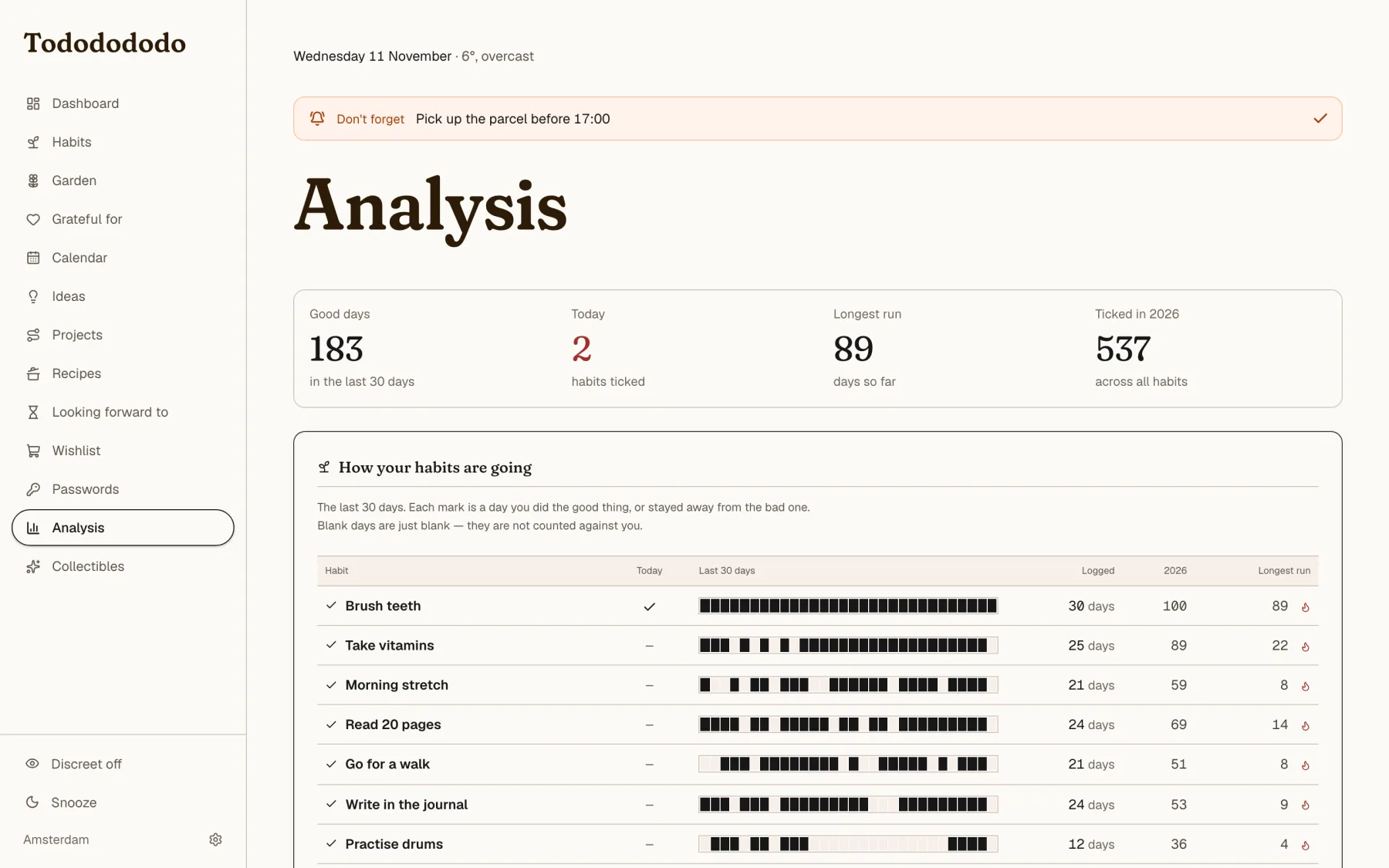
Most todo apps want to measure you. Todododo does the opposite, and that is a rule for every number it shows:
- Count what was done, never what was missed. No percentages, no compliance bars, no "overdue 14 days".
- Never grade. No "slipping" or "not started". A brand-new habit says "just added", not zero.
- Streaks forgive. A day off in a planned chain doesn't break the run, and your best-ever run is kept separately, so a broken streak takes nothing away.
- Nothing is late. A date that has passed is only a date. The one exception is a planned todo, which turns red, because it's still open.
The board: room for three
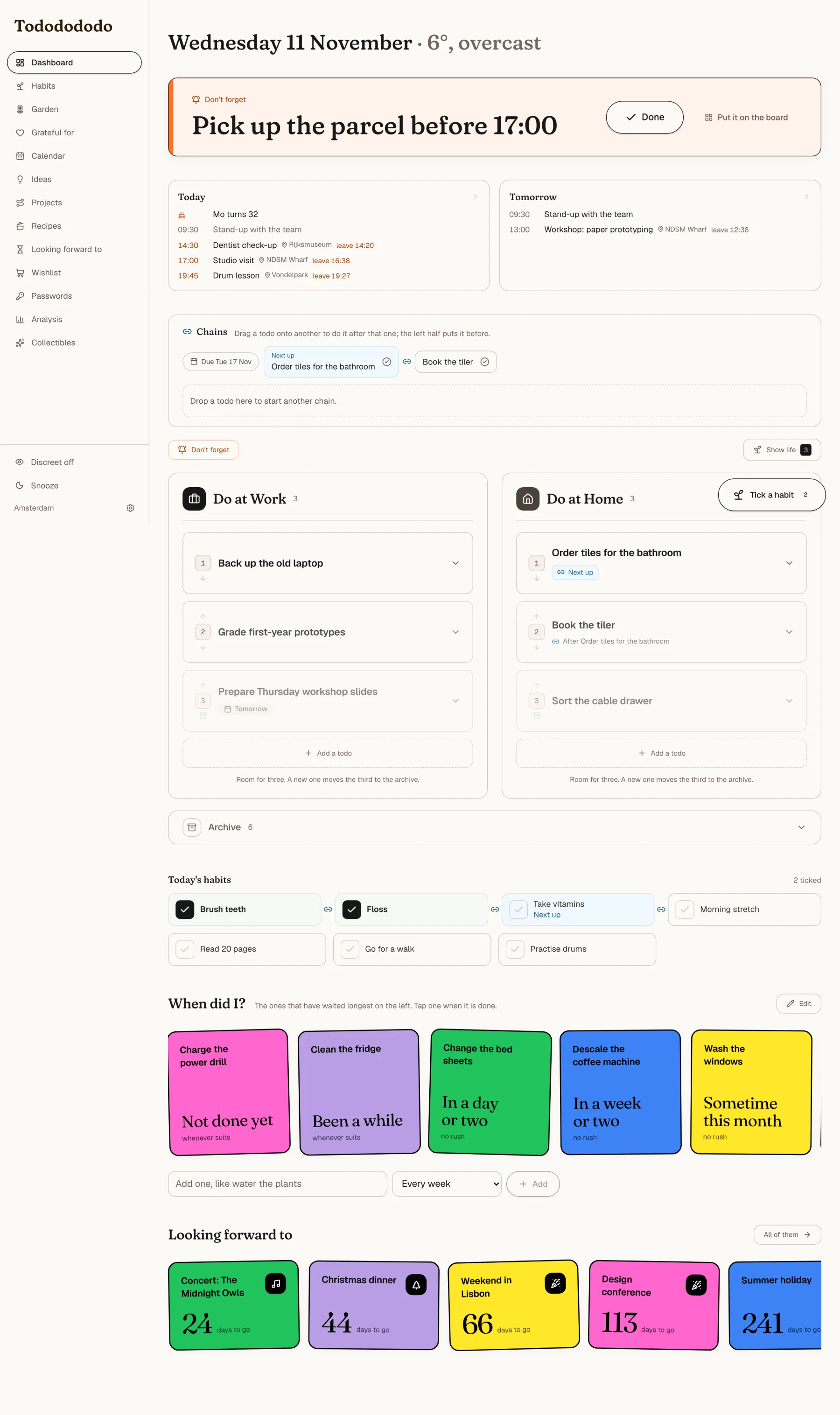
The board has three columns: work, home and life. Each holds three open todos in order of priority. Add a fourth and the lowest one slips into a drawer called the archive. The rule is enforced by the server, so it holds whether a todo arrives from the board, from my phone or from Claude. The first card is at full strength, the second fades to 75% and the third to 50%.
A big list is a list you avoid. Three is a list you can look at.
Some todos need a different treatment:
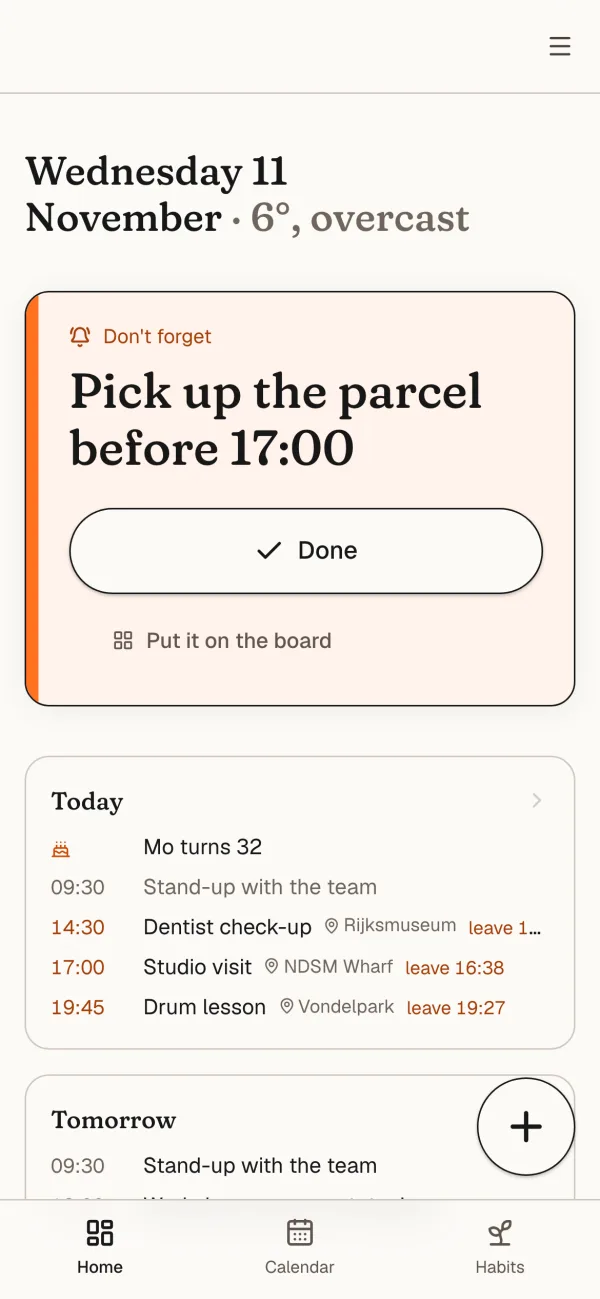
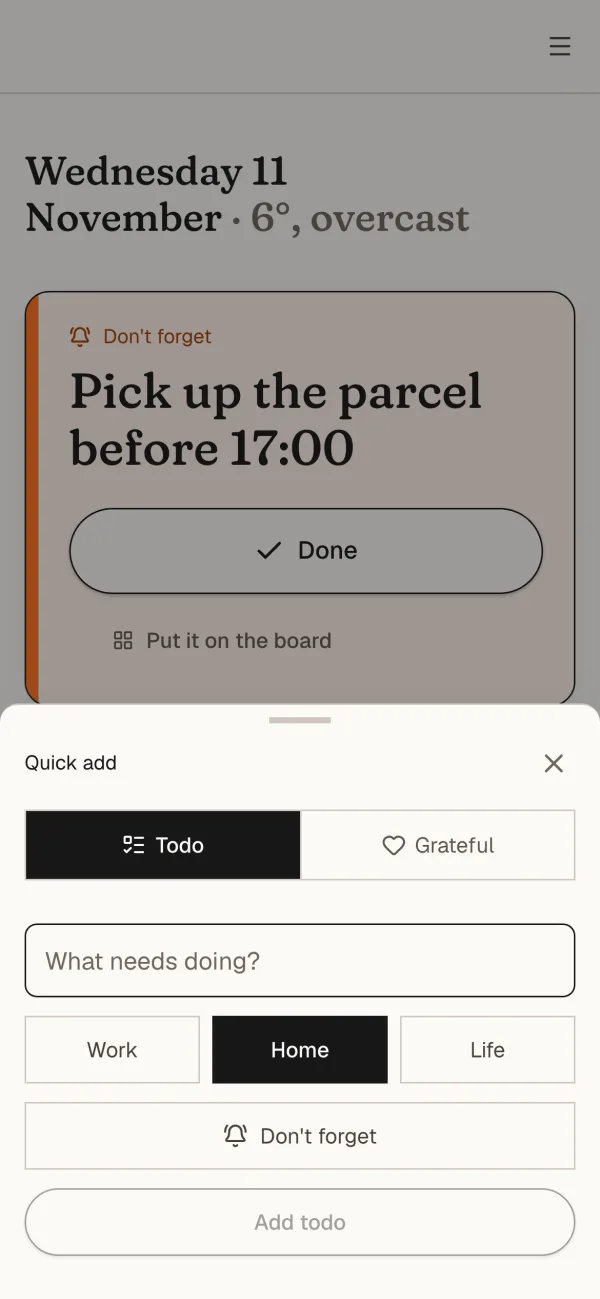
- Don't forget takes over the top of every screen until it's done, and takes no room on the board. It's for the parcel that has to be picked up before 17:00.
- Chains link todos in a line: first order the tiles, then book the tiler. A whole chain can have a deadline, and the first open one is always marked "next up".
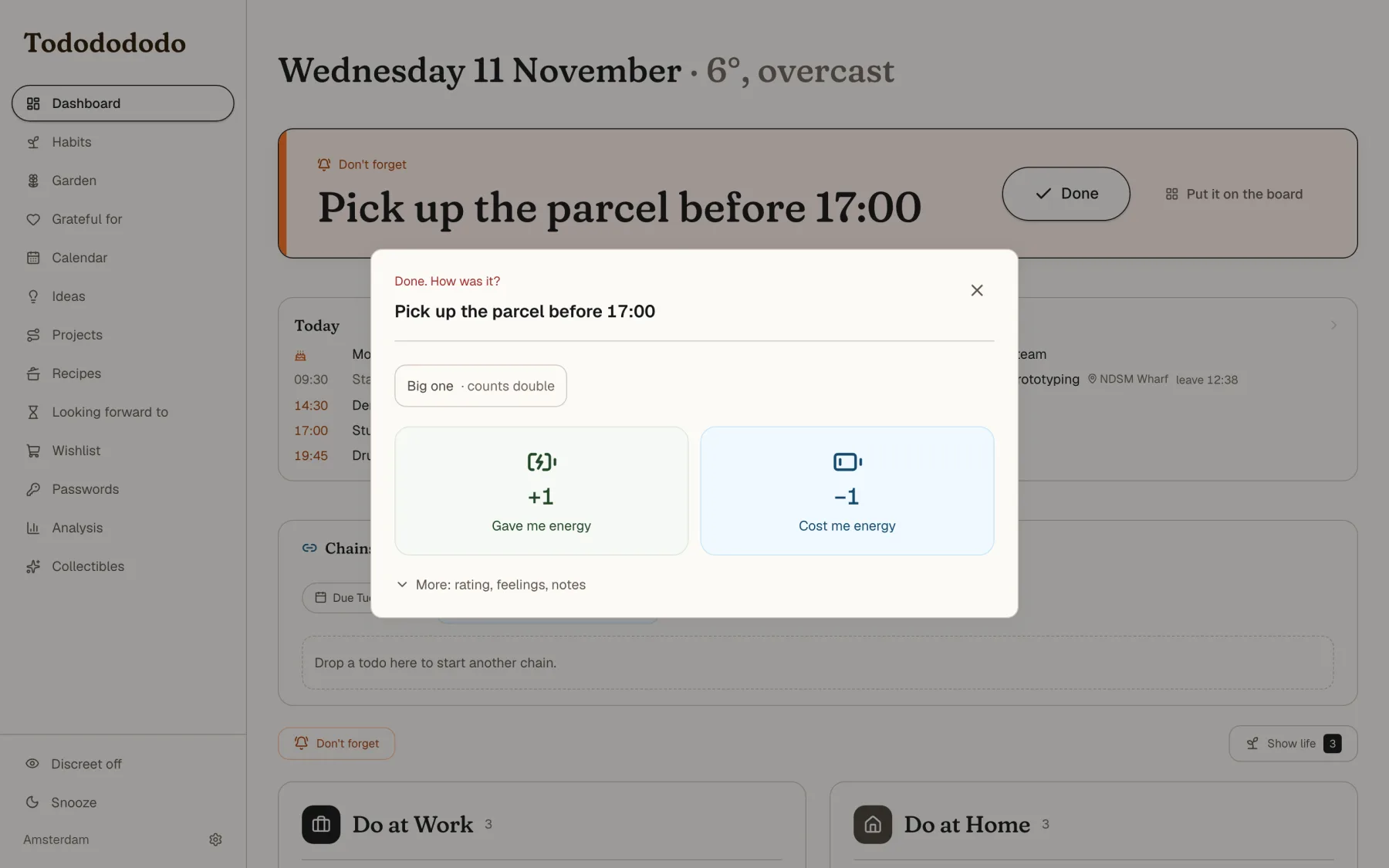
- Finishing is one tap: did it give me energy or cost me energy? Rating, feelings and notes are tucked behind "More". Over time the analysis page shows which kinds of todo I actually enjoy.
Habits that stack
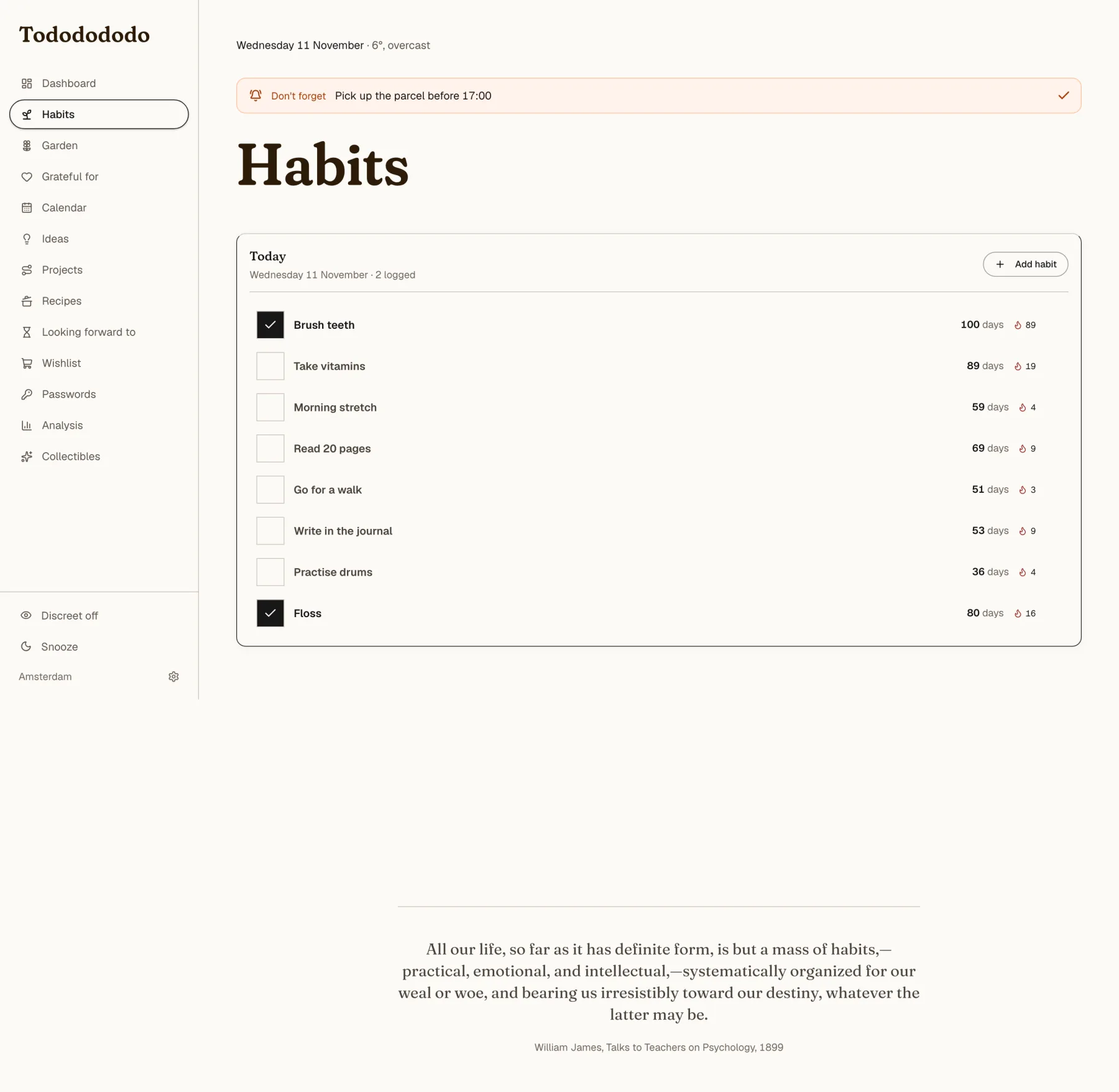
Habits work as chains: after I brush my teeth I floss, after flossing I take my vitamins, after the vitamins I stretch. Drag one habit onto another to link them. On the dashboard the chain shows as a row, and the habit whose cue is done is marked "Next up". There are no chain scores, because the chain is a cue, not a game.
A chain can also be planned: it appears from 19:30 on weekdays, say, and stays until midnight. Before that it's out of sight, so the screen only shows what's relevant now.
A garden instead of points
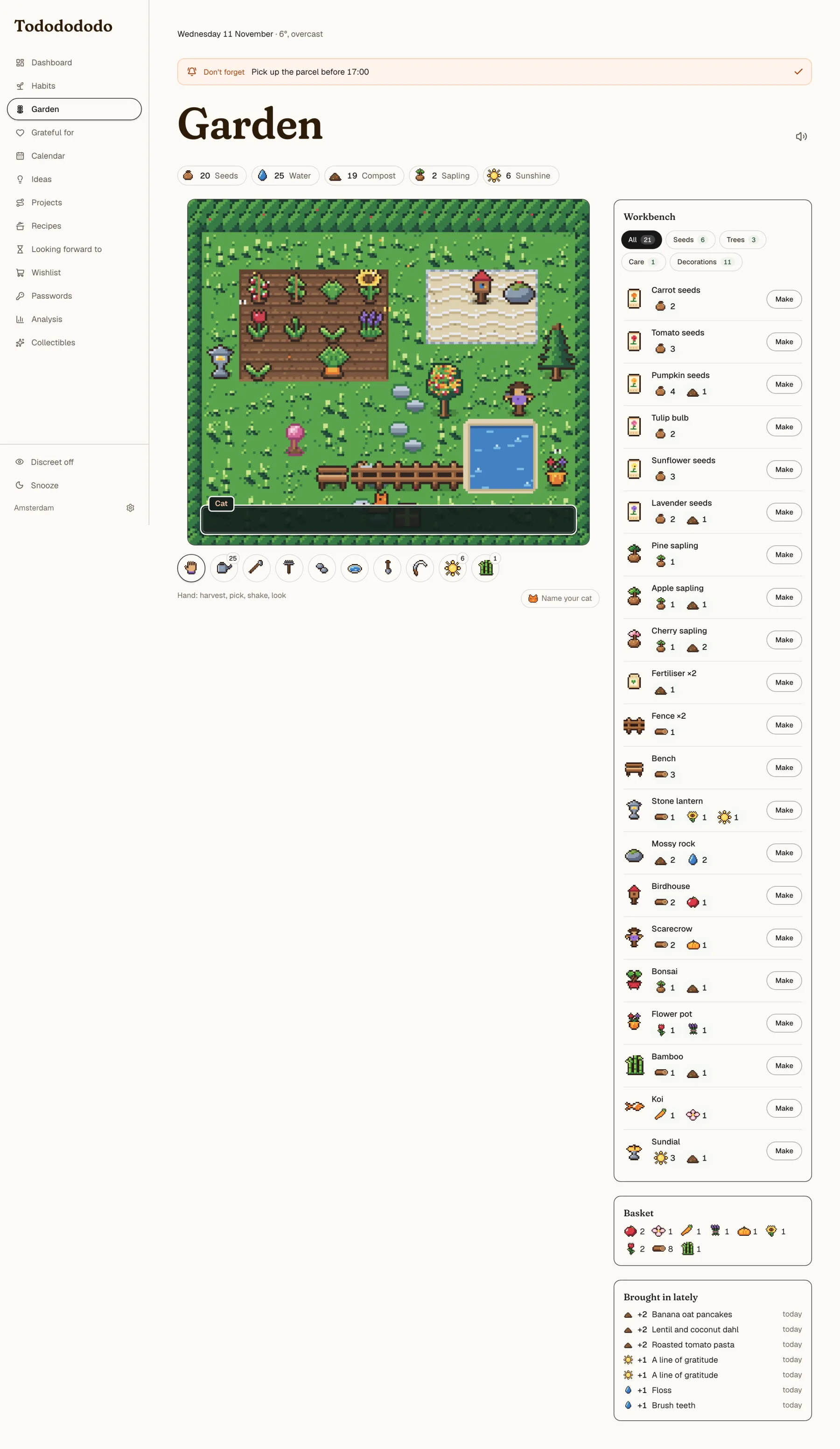
I wanted work to feel rewarded without scores. Finishing a todo earns seeds, ticking a habit earns water, a project step earns compost, a line of gratitude earns sunshine and cooking a recipe earns scraps for the compost heap. You spend them in a small pixel garden: plant crops, flowers and trees, craft decorations at a workbench, and cut the lawn when it grows tall.
The rules keep the tone of the rest of the app. Plants grow by water given, never by days passed, and they never wilt. Tall grass is only a look, never a penalty. A ginger cat wanders around the garden, naps in sunny spots and hides in the hedge when it rains, using the real weather outside. It doesn't talk, it only says "Miauw".
A calendar that knows when to leave
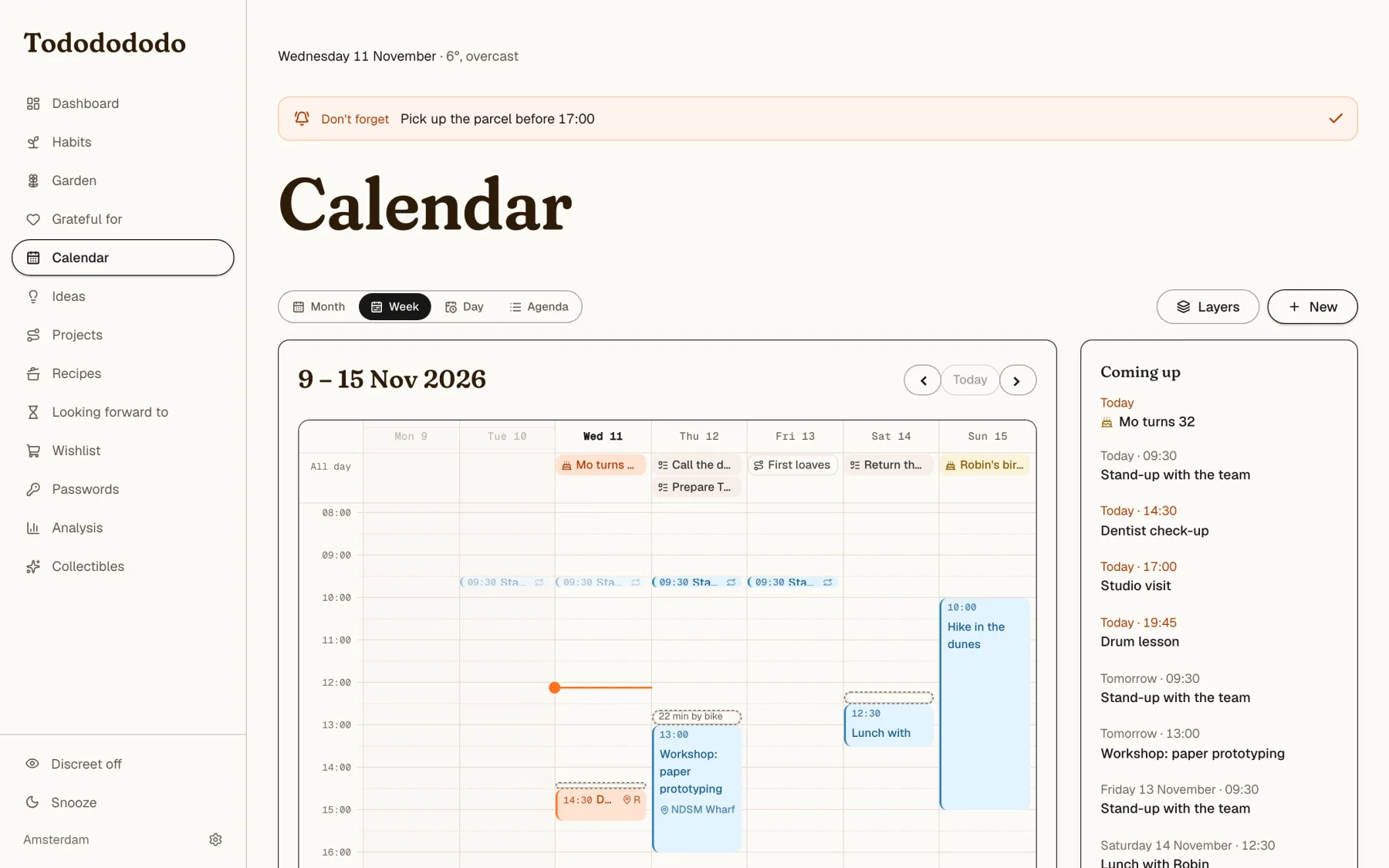
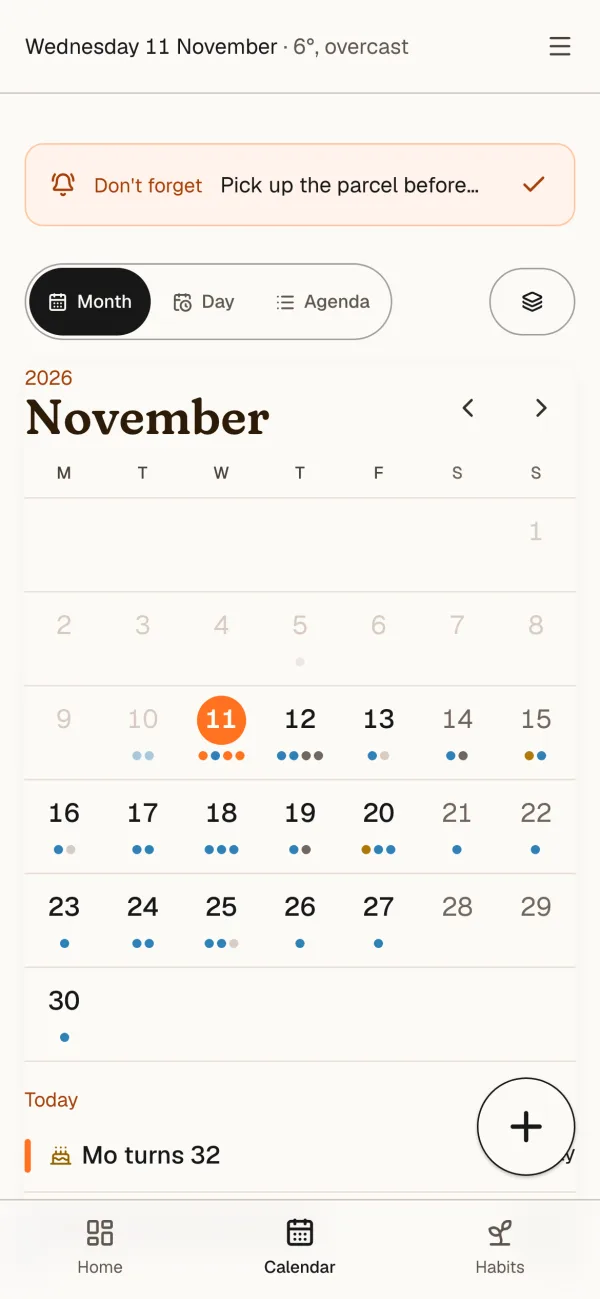
I built my own calendar to replace the one I used. It has appointments, birthdays, planned todos, countdowns and project steps as layers you can switch on and off, with month, week, day and agenda views.
Appointments know where they are. Todododo looks up the travel time from home by bike (or car, or on foot) and shows "leave 14:20" right on the dashboard. Past days fade quietly. Away from home, the calendar follows the clock of the device I'm holding. It also publishes a private feed, so my phone's own calendar can subscribe to it.
Projects, ideas and the pace of making
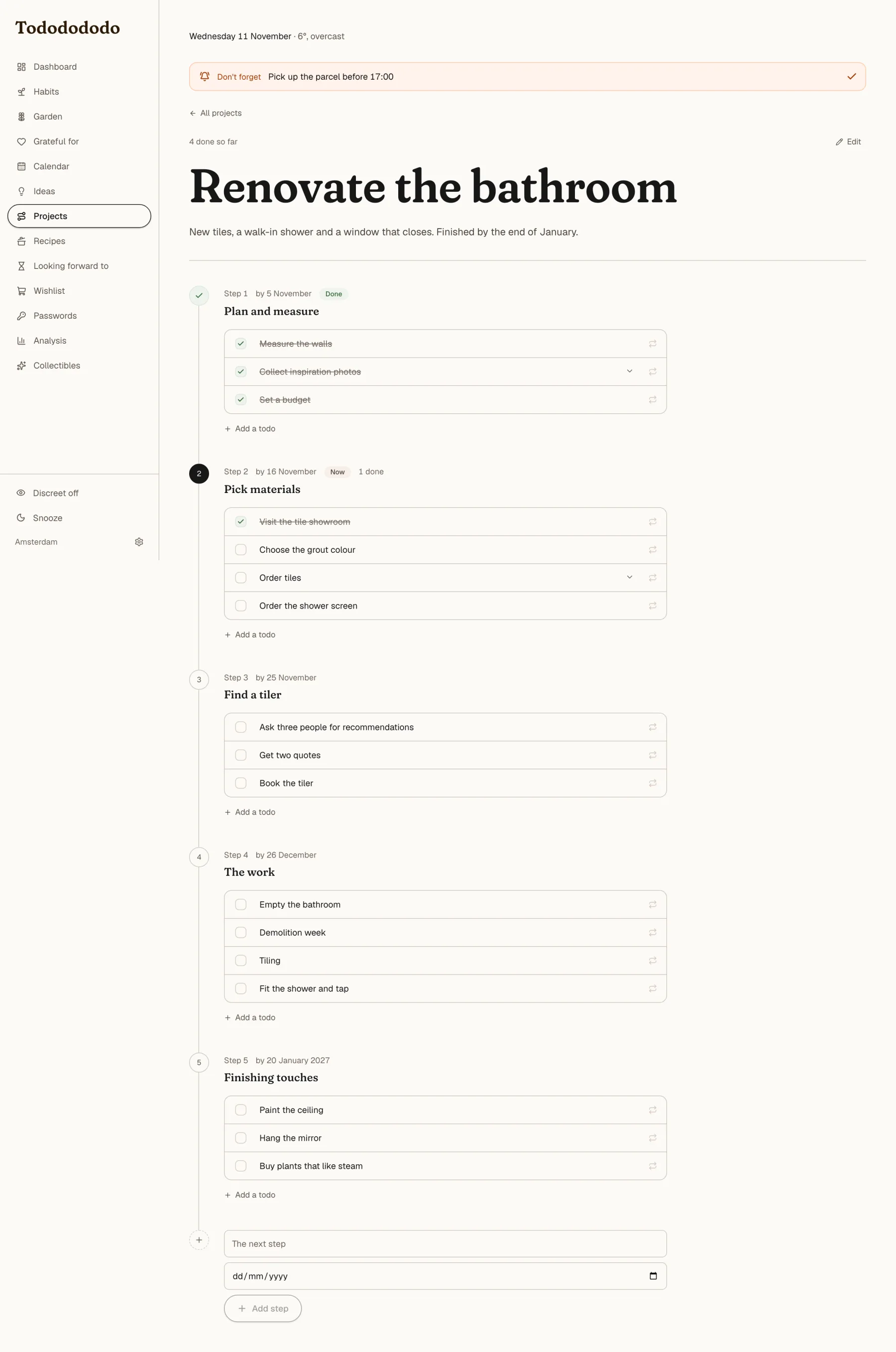
Projects are big goals reached in steps along a timeline. They stay off the board on purpose, so a huge goal doesn't bury the day. Finishing a whole project is the one big celebration in the app. I can drop a plan as a markdown file and it becomes a project with steps and todos.
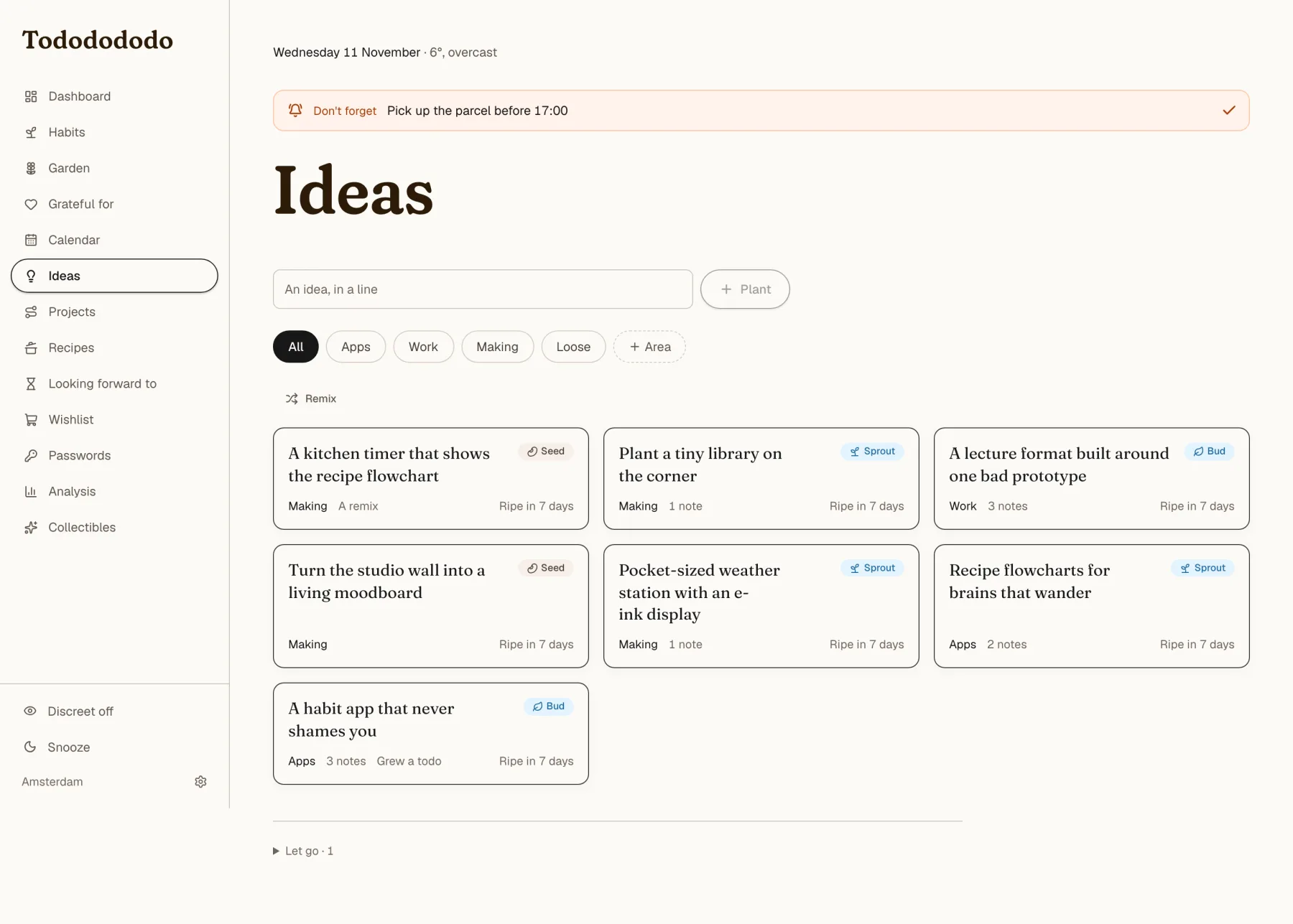
Ideas are my weak spot. I love collecting them and I'm bad at pacing what I actually make. So the idea corner separates the two: collecting is unlimited and free, making has limited room. An idea is a seed. It grows through tending (a seed, a sprout, a bud, a bloom), can be remixed with other ideas into a new one, and can grow into a todo, a project or a wish. An idea only becomes a project after seven days in the corner, as a brake on starting things while the excitement is hot. Letting an idea go is a choice, never a failure.
Recipes as flowcharts
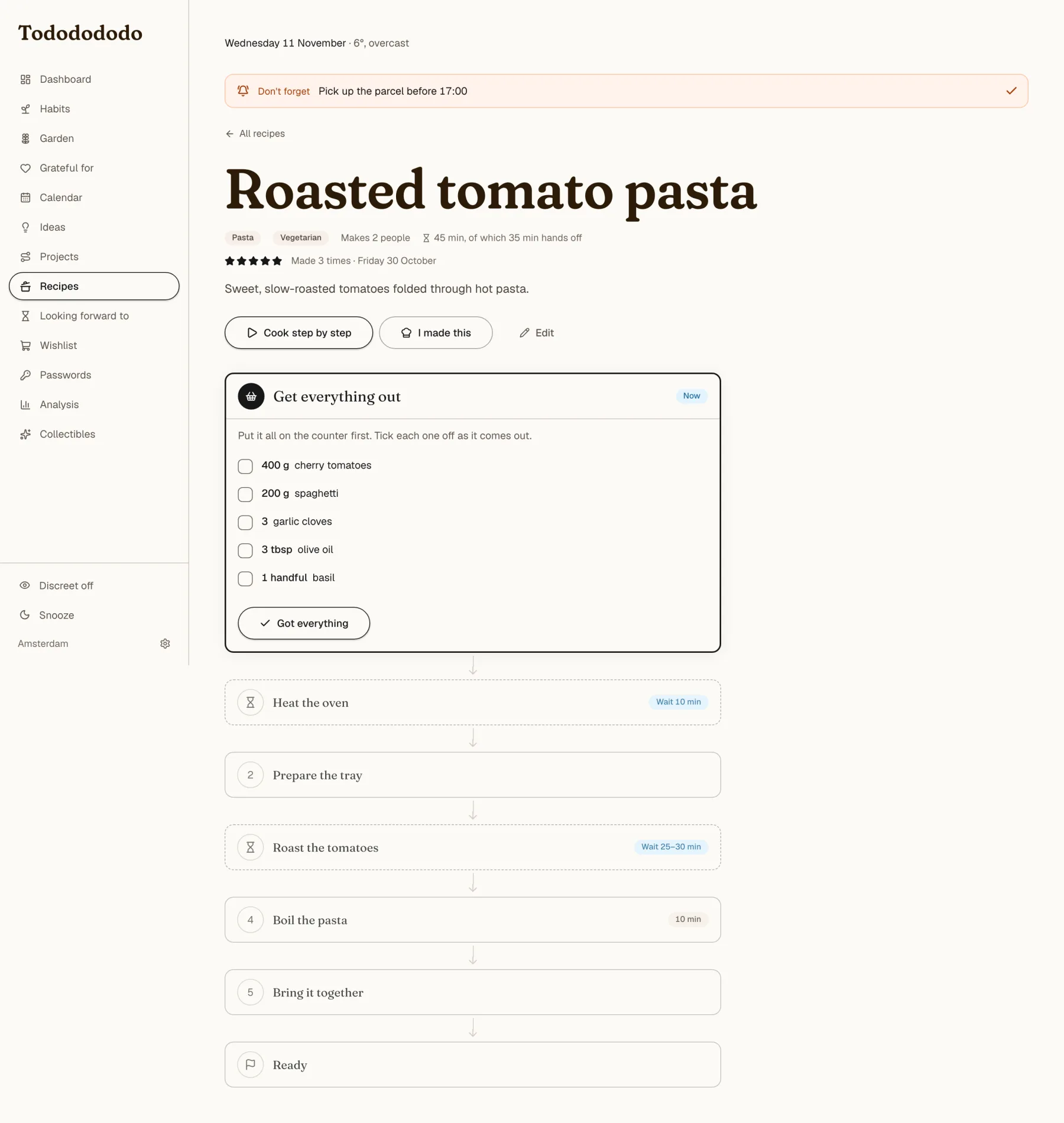
Recipes are drawn as a flowchart built for an ADHD brain. A first box says "get everything out", with the ingredients as tick boxes. Then there's one box per step. Only the box you're on is open, finished boxes fold into a green line and boxes ahead show just a title and a time. Hands-off steps (the oven is doing the work) are dashed with an hourglass. Every sentence in a step is its own tick box, and timers beep when they run out. A "cook step by step" mode shows one step at a time in big type and keeps the screen awake.
More small things
- When did I? is a strip of chores that come round again, like watering the plants or descaling the coffee machine. Each has its own rhythm. The wording is relaxed ("sometime this month, no rush") and never red.
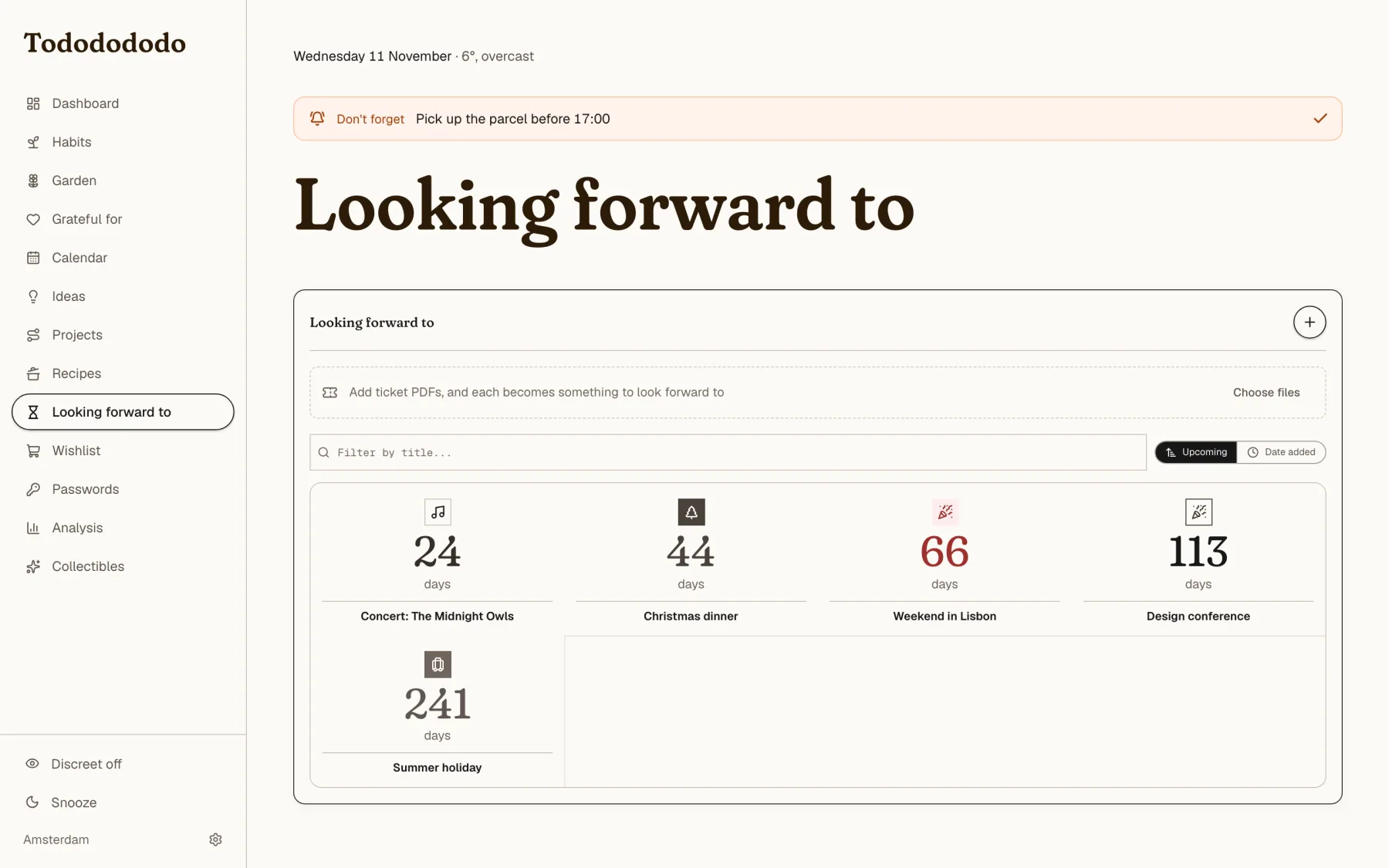
- Looking forward to counts down to concerts and holidays, and can hold the tickets, which Todododo reads from the PDF.
- Grateful for is three lines a day, and nothing more. No streak, no "you skipped".
- Discreet mode blurs every todo title, for when someone looks over my shoulder.
- Snooze covers the app with a slow breathing circle until I touch anything.
- Brain tickles deals instructions from my card deck that break a well-worn route through the day, and they can land on the board as a todo.
On my phone
On a phone the desktop's hover and drag interactions are replaced by things a thumb can do. Habits are tiles you tap once, the board shows one column at a time (and opens on the one for where I am), and a round plus button opens a quick-add sheet with a todo tab and a gratitude tab.
The design: a school notebook in afternoon light
The look is a school notebook in afternoon light. The paper is cream (#FDFBF9), the ink is charcoal, page titles are in a cocoa brown and the single accent is a marker orange. Cards are cream on cream with a thin dark edge and almost no shadow. There are no gradients, no glass, no dark mode and no emoji.
A few rules do most of the work:
- Orange means today. Anything that is on today's date and not over yet turns orange: the next appointment, a birthday, a planned todo. Tomorrow and later stay in their own colour.
- Colour is a wash with its own ink. Pale green for done, pale blue for linked or scheduled, pale yellow for pending, pale red for destructive. Never a saturated fill with white text.
- Stickers are the exception. The "Looking forward to" and "When did I?" strips are flat, bright riso inks with black type and a slight lean, because I asked for them to be colourful and a bit quirky. They are decoration and never mean a status.
- Buttons are pills. The main action is a cream pill with a charcoal edge that lifts a pixel on hover.
- Two typefaces. Fraunces, a soft serif, for every heading, and Geist for the rest. Everything is sentence case, with no invented codes or acronyms, and pages have no taglines.
- Motion is nearly invisible. Only transforms and opacity animate, and every animation respects reduced motion.
The copy has a voice too. Cheers after a habit sound like "Noted. Future you approves." If a new sentence doesn't sound like that, it gets rewritten.
Under the hood
For the curious, and with no screenshots because they'd show nothing interesting:
- Stack. Laravel (PHP) serves a JSON API and my GitHub sign-in. The front end is SvelteKit with Svelte 5, TypeScript and Tailwind, built as a client-only app. MySQL on my own server.
- One door, one person. Only my GitHub account gets in. Every side door (the extension, the e-ink screen, the calendar feed, Claude) has its own separate key, and a test fails if a new route appears outside the lock.
- A Chrome extension adds the page I'm looking at to the wishlist. It reads the price and picture from inside the page, because shops block servers from fetching them.
- A password vault with zero knowledge: everything is encrypted in the browser under my master password, and the server only ever sees ciphertext. The extension autofills logins from it.
- An e-ink screen (a TRMNL) on my desk shows today at a glance: what's still ahead, the home column and the next countdown.
- A Claude connector. Through MCP, Claude can read my todos, calendar, projects and recipes and add to them, so I can say "plan this as a project" in a chat and it lands in the app. It can move appointments, but it can never delete anything.
Working with Claude
Todododo is the project where I learned how much a clear set of rules is worth. The project has a working agreement that Claude reads at the start of every session, with the tone rules, the design rules, the data model and the traps we've hit before. Each decision I make ("no streaks", "plants never wilt", "no energy budget") ends up as a line in that file, so the next session starts with the same taste.
The most useful sentences in that document aren't about code. They're things like "count what was done, never what was missed" and "nothing costs anything and nothing covers the app; don't bring back a budget without being asked." I design the feeling, Claude builds it, and the rules keep us honest.